管道
popen
可能最简单的在两个进程之间通信的方法就是popen和pclose函数了。
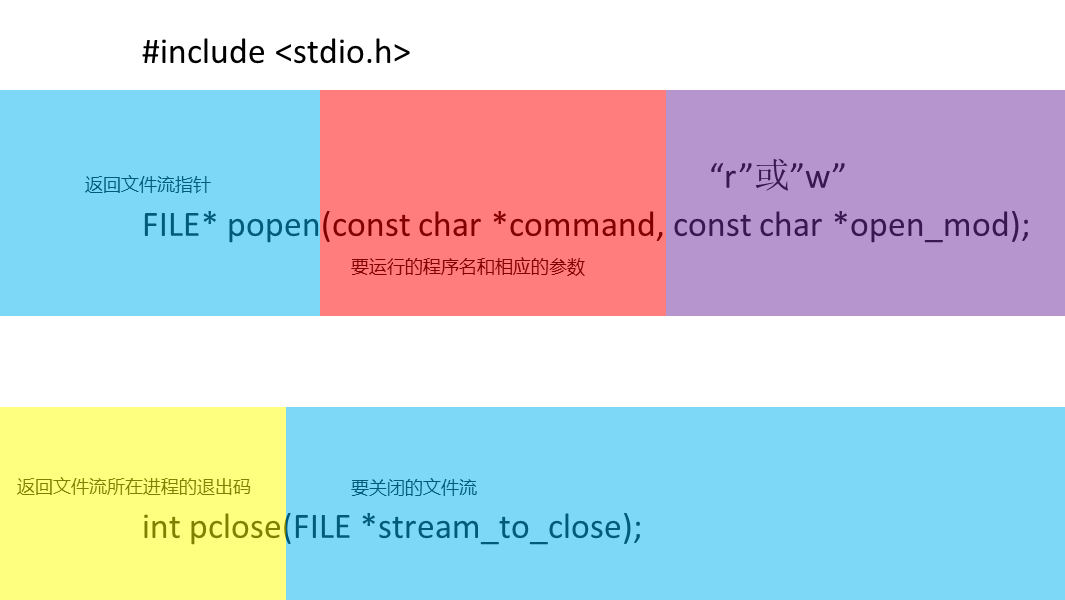
pclose会等待进程结束。如果pclose之前执行了wait,被调用进程退出状态会丢失,此时pclose返回-1并设置errno为ECHILD。
演示: 读取外部程序的输出
 1 #include <unistd.h>
 2 #include <stdlib.h>
 3 #include <stdio.h>
 4 #include <string.h>
 5
 6 int main() {
 7     FILE *read_fp;
 8     char buffer[BUFSIZ + 1];
 9     int chars_read;
10     memset(buffer, '\0', sizeof(buffer));
11     read_fp = popen("uname -a", "r");
12     if (read_fp != NULL) {
13         chars_read = fread(buffer, sizeof(char), BUFSIZ, read_fp);
14         if (chars_read > 0) {
15             printf("Output was: -\n%s\n", buffer);
16         }
17         pclose(read_fp);
18         exit(EXIT_SUCCESS);
19     }
20     exit(EXIT_FAILURE);
21 }
演示: 输出到外部程序
 1 #include <unistd.h>
 2 #include <stdlib.h>
 3 #include <stdio.h>
 4 #include <string.h>
 5
 6 int main() {
 7     FILE *write_fp;
 8     char buffer[BUFSIZ + 1];
 9     sprintf(buffer, "Once upon a time, there was...\n");
10     write_fp = popen("od -c", "w");
11     if (write_fp != NULL) {
12         fwrite(buffer, sizeof(char), strlen(buffer), write_fp);
13         pclose(write_fp);
14         exit(EXIT_SUCCESS);
15     }
16     exit(EXIT_FAILURE);
17 }
pipe
pipe是较popen底层的函数。

关于errno的设置,linux手册中定义了下面的错误:
- EMFILE: 进程使用的文件描述符过多。
- ENFILE: 系统文件表已满。
- EFAULT: 文件描述符无效。
写到file_descriptor[1]的所有数据可以从file_descriptor[0]读回来。
演示: 跨越fork调用的管道
 1 #include <stdio.h>
 2 #include <unistd.h>
 3 #include <string.h>
 4 #include <stdlib.h>
 5
 6 int main() {
 7     int data_processed;
 8     int file_pipes[2];
 9     const char some_data[] = "294753618";
10     char buffer[BUFSIZ + 1];
11     pid_t fork_result;
12
13     memset(buffer, 0, sizeof(buffer));
14
15     if (pipe(file_pipes) == 0) {
16         fork_result = fork();
17         if (fork_result == -1) {
18             fprintf(stderr, "Fork failure");
19             exit(EXIT_FAILURE);
20         }
21
22         if (fork_result == 0) { // child
23             data_processed = read(file_pipes[0], buffer, BUFSIZ);
24             printf("Read %d bytes: %s\n", data_processed, buffer);
25             exit(EXIT_SUCCESS);
26         } else { // father
27             data_processed = write(file_pipes[1], some_data, strlen(some_data));
28             printf("Write %d bytes\n", data_processed);
29             wait(fork_result);
30         }
31     }
32     exit(EXIT_SUCCESS);
33 }
命名管道FIFO
FIFO在文件系统中以文件名的形式存在。
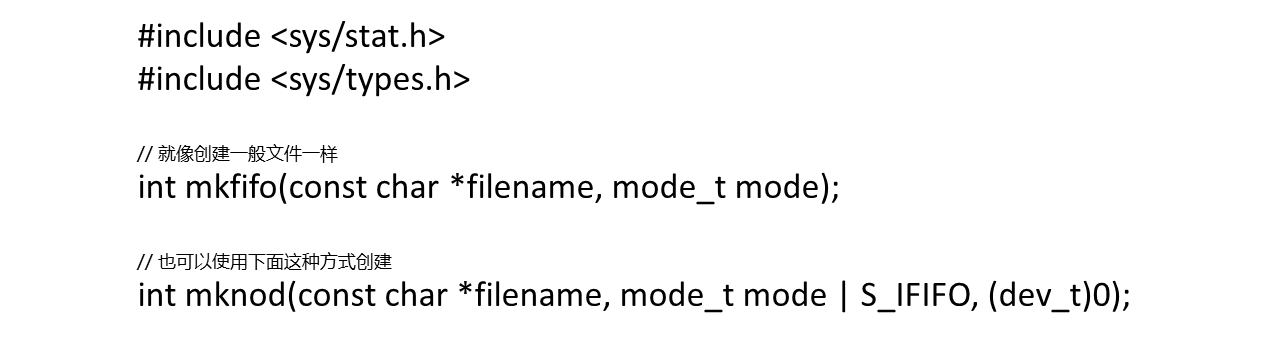
打开FIFO文件的模式有几种不同组合
open(const char *path, O_RDONLY);
这种情况下,open会阻塞,除非有一个进程以写的方式打开同一个FIFO。
open(const char *path, O_RDONLY | O_NONBLOCK);
open立刻返回。
open(const char *path, O_WRONLY);
open阻塞,知道有一个进程以读的方式打开同一个FIFO。
open(const char *path, O_WRONLY | O_NONBLOCK);
立刻返回,但如果没有一个进程以读的方式打开FIFO文件,open将返回-1并且FIFO也不会被打开。
信号量机制
使用下面这组函数就够了。
1 #include <sys/sem.h>
2
3 int semctl(int sem_id, int sem_num, int command, ...);
4 int semget(key_t key, int num_sems, int sem_flags);
5 int semop(int sem_id, struct sembuf *sem_ops, size_t num_sem_ops);
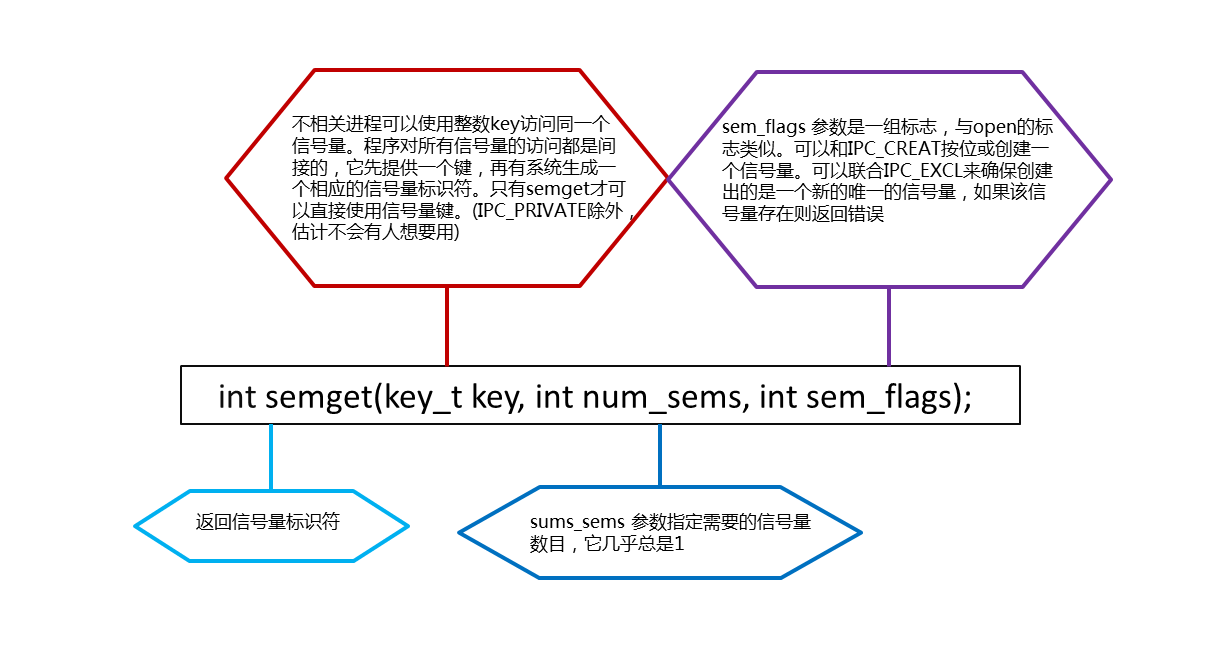
参数key的作用很像一个文件名,它代表程序可能要使用的某个资源,如果多个程序使用相同的key值,它将负责协调工作。
semget的作用是创建一个新信号量或取得一个已有信号量的键值。
semop用于改变信号量的值。

semctl函数用来直接控制信号量信息。

演示: 使用信号量
使用这个命令编译运行
$ gcc sem.c -o sem
$ ./sem 1 &
$ ./sem
字符XO分别表示第一个和第二个调用实例。
  1 /*
  2    file: sem.c
  3    If the program is the first to be called (i.e. it's called with a parameter
  4    and argc > 1), a call is made to set_semvalue to initialize the semaphore and op_char is
  5    set to X. */
  6
  7 #include <unistd.h>
  8 #include <stdlib.h>
  9 #include <stdio.h>
 10
 11 #include <sys/sem.h>
 12
 13 #if defined(__GNU_LIBRARY__) && !defined(_SEM_SEMUN_UNDEFINED)
 14     /* union semun is defined by including <sys/sem.h> */
 15 #else
 16     /* according to X/OPEN we have to define it ourselves */
 17     union semun {
 18         int val;                    /* value for SETVAL */
 19         struct semid_ds *buf;       /* buffer for IPC_STAT, IPC_SET */
 20         unsigned short int *array;  /* array for GETALL, SETALL */
 21         struct seminfo *__buf;      /* buffer for IPC_INFO */
 22     };
 23 #endif
 24
 25 static int set_semvalue(void);
 26 static void del_semvalue(void);
 27 static int semaphore_p(void);
 28 static int semaphore_v(void);
 29
 30 static int sem_id;
 31
 32
 33 int main(int argc, char *argv[]) {
 34     int i;
 35     int pause_time;
 36     char op_char = 'O';
 37
 38     srand((unsigned int)getpid());
 39
 40     sem_id = semget((key_t)1234, 1, 0666 | IPC_CREAT);
 41
 42     if (argc > 1) {
 43         if (!set_semvalue()) {
 44             fprintf(stderr, "Failed to initialize semaphore\n");
 45             exit(EXIT_FAILURE);
 46         }
 47         op_char = 'X';
 48         sleep(2);
 49     }
 50
 51     for(i = 0; i < 10; i++) {
 52
 53         if (!semaphore_p()) exit(EXIT_FAILURE);
 54         printf("%c", op_char);fflush(stdout);
 55         pause_time = rand() % 3;
 56         sleep(pause_time);
 57         printf("%c", op_char);fflush(stdout);
 58
 59         if (!semaphore_v()) exit(EXIT_FAILURE);
 60         pause_time = rand() % 2;
 61         sleep(pause_time);
 62     }
 63
 64     printf("\n%d - finished\n", getpid());
 65
 66     if (argc > 1) {
 67         sleep(10);
 68         del_semvalue();
 69     }
 70
 71     exit(EXIT_SUCCESS);
 72 }
 73
 74 static int set_semvalue(void) {
 75     union semun sem_union;
 76
 77     sem_union.val = 1;
 78     if (semctl(sem_id, 0, SETVAL, sem_union) == -1) return(0);
 79     return(1);
 80 }
 81
 82 static void del_semvalue(void) {
 83     union semun sem_union;
 84
 85     if (semctl(sem_id, 0, IPC_RMID, sem_union) == -1)
 86         fprintf(stderr, "Failed to delete semaphore\n");
 87 }
 88
 89 static int semaphore_p(void) {
 90     struct sembuf sem_b;
 91
 92     sem_b.sem_num = 0;
 93     sem_b.sem_op = -1; /* P() */
 94     sem_b.sem_flg = SEM_UNDO;
 95     if (semop(sem_id, &sem_b, 1) == -1) {
 96         fprintf(stderr, "semaphore_p failed\n");
 97         return(0);
 98     }
 99     return(1);
100 }
101
102 static int semaphore_v(void) {
103     struct sembuf sem_b;
104
105     sem_b.sem_num = 0;
106     sem_b.sem_op = 1; /* V() */
107     sem_b.sem_flg = SEM_UNDO;
108     if (semop(sem_id, &sem_b, 1) == -1) {
109         fprintf(stderr, "semaphore_v failed\n");
110         return(0);
111     }
112     return(1);
113 }
共享内存
共享内存的函数类似于信号量函数。
1 #include <sys/shm.h>
2
3 void *shmat(int shm_id, const void *shm_addr, int shmflg);
4 int shmctl(int shm_id, int cmd, struct shmid_ds *buf);
5 int shmdt(const void *shm_addr);
6 int shmget(key_t key, size_t size, int shmflg);
我们用shmget函数来创建共享内存,如果失败,返回-1。
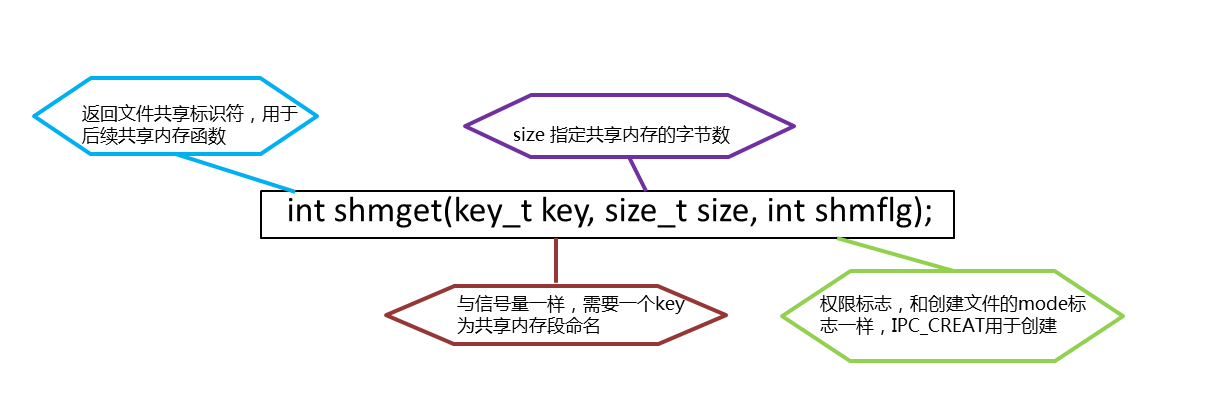
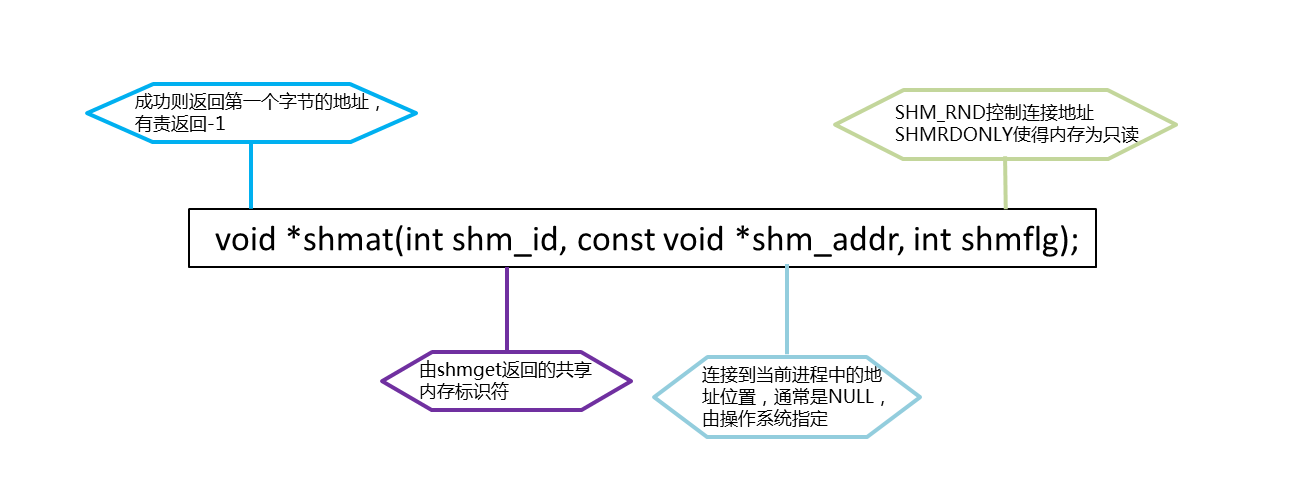
接下来,为了启动对该共享内存的访问,必须将其链接到一个进程的地址空间中,这项工作由shmat函数完成。
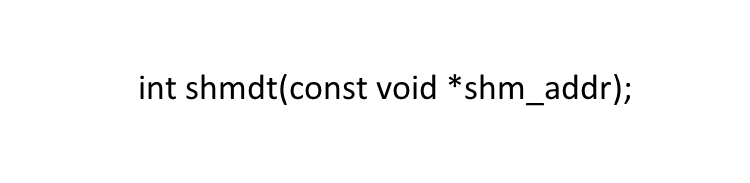
shmdt函数的作用是将共享内存从当前进程中分离。
共享内存的控制函数要稍微简单一些。

需要注意的是,进程同步部分需要自己写。
消息队列
和前面的方式类似。
1 #include <sys/msg.h>
2
3 int msgctl(int msqid, int cmd, struct msqid_ds *buf);
4 int msgget(key_t key, int msgflg);
5 int msgrcv(int msqid, void *msq_ptr, size_t msg_sz, long int msgtype, int msgflg);
6 int msgsnd(int msqid, const void *msg_ptr, size_t msg_sz, int msgflg);
用msgget创建和访问一个消息队列。
用msgsnd把消息添加到消息队列中。
int msgsnd(int msqid, const void *msg_ptr, size_t msg_sz, int msgflg);
消息的结构必须以长整形开始。
1 struct my_massage {
2     long int massage_type;
3     /* data */
4 }
msgrcv从一个消息队列中获取消息。
int msgrcv(int msqid, void *msq_ptr, size_t msg_sz, long int msgtype, int msgflg);
如果msgtype为0,就获取第一个可用消息,如果大于0,就获取具有相同消息类型(massage_type)的第一个可用消息。如果想获取类型小于或等于n的消息,就传递-n。
msgctl与共享内存的控制函数非常相似。
int msgctl(int msqid, int cmd, struct msqid_ds *buf);
msqid_ds用至少包含以下成员:
struct shmid_ds {
    uid_t shm_perm.uid;
    uid_t shm_perm.gid;
    mode_t shmperm.mode;
};
cmd也和共享内存的一样。
演示: 消息队列
程序1
 1 /* Here's the receiver program. */
 2
 3 #include <stdlib.h>
 4 #include <stdio.h>
 5 #include <string.h>
 6 #include <errno.h>
 7 #include <unistd.h>
 8
 9 #include <sys/msg.h>
10
11
12 struct my_msg_st {
13     long int my_msg_type;
14     char some_text[BUFSIZ];
15 };
16
17 int main() {
18     int running = 1;
19     int msgid;
20     struct my_msg_st some_data;
21     long int msg_to_receive = 0;
22
23     msgid = msgget((key_t)1234, 0666 | IPC_CREAT);
24
25     if (msgid == -1) {
26         fprintf(stderr, "msgget failed with error: %d\n", errno);
27         exit(EXIT_FAILURE);
28     }
29
30     while(running) {
31         if (msgrcv(msgid, (void *)&some_data, BUFSIZ,
32                    msg_to_receive, 0) == -1) {
33             fprintf(stderr, "msgrcv failed with error: %d\n", errno);
34             exit(EXIT_FAILURE);
35         }
36         printf("You wrote: %s", some_data.some_text);
37         if (strncmp(some_data.some_text, "end", 3) == 0) {
38             running = 0;
39         }
40     }
41
42     if (msgctl(msgid, IPC_RMID, 0) == -1) {
43         fprintf(stderr, "msgctl(IPC_RMID) failed\n");
44         exit(EXIT_FAILURE);
45     }
46
47     exit(EXIT_SUCCESS);
48 }
程序2
 1 #include <stdlib.h>
 2 #include <stdio.h>
 3 #include <string.h>
 4 #include <errno.h>
 5 #include <unistd.h>
 6
 7 #include <sys/msg.h>
 8
 9 #define MAX_TEXT 512
10
11 struct my_msg_st {
12     long int my_msg_type;
13     char some_text[MAX_TEXT];
14 };
15
16 int main() {
17     int running = 1;
18     struct my_msg_st some_data;
19     int msgid;
20     char buffer[BUFSIZ];
21
22     msgid = msgget((key_t)1234, 0666 | IPC_CREAT);
23
24     if (msgid == -1) {
25         fprintf(stderr, "msgget failed with error: %d\n", errno);
26         exit(EXIT_FAILURE);
27     }
28
29     while(running) {
30         printf("Enter some text: ");
31         fgets(buffer, BUFSIZ, stdin);
32         some_data.my_msg_type = 1;
33         strcpy(some_data.some_text, buffer);
34
35         if (msgsnd(msgid, (void *)&some_data, MAX_TEXT, 0) == -1) {
36             fprintf(stderr, "msgsnd failed\n");
37             exit(EXIT_FAILURE);
38         }
39         if (strncmp(buffer, "end", 3) == 0) {
40             running = 0;
41         }
42     }
43
44     exit(EXIT_SUCCESS);
45 }
.png)
.png)