Table of Contents:
Observer Pattern
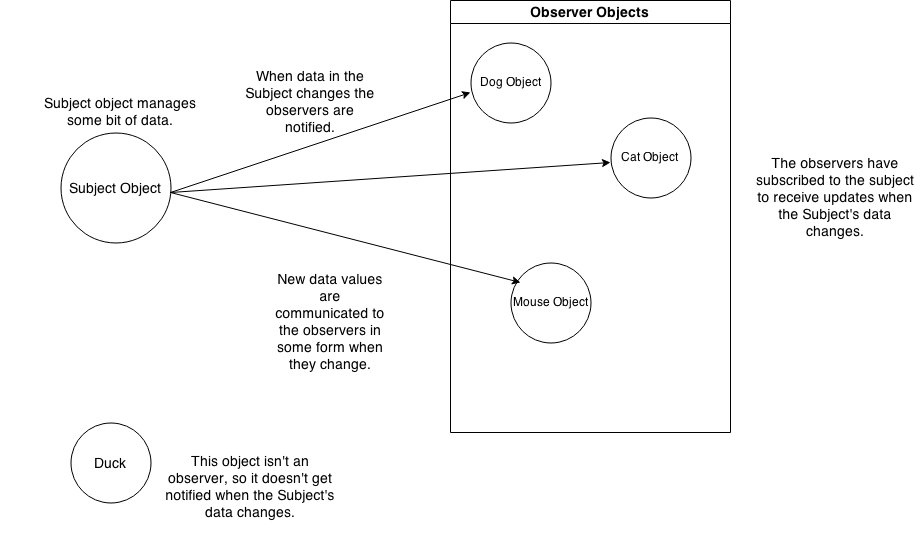
You know the newspaper or magazine subscriptions work:
- A newspaper publisher goes into business and begins publishing newspapers.
- You subscribe to a particular publisher, and every time there’s a new edition it gets delivered to you. As long as you remain a subscriber, you get new newspapers.
- You unsubscribe when you don’t want papers anymore, and they stop being delivered.
- While the publisher remains in business, people, hotels, airlines and other businesses constantly subscribe and unsubscribe to the newspaper.
Publisher + Subscribers = Observer Pattern
The Observer Pattern defined: the class diagram
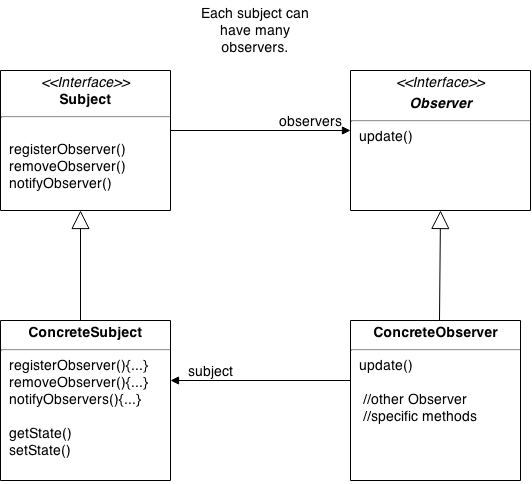
notifyObserver() may call update() of every Observer that had been registered.
Decorator Pattern
Constructing a drink order with Decorators
We start with our DarkRoast object.
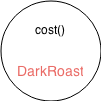
The customer wants Mocha, so we create a Mocha object and wrap it around the DarkRoast.
.png)
The customer also wants Whip, so we create a Whip decorator and wrap Mocka with it.
.png)
Now it’s tome to compute the cost for the customer.
- First, we call
cost()on the outmost decorator, Whip. - Whip calls cost() on Mocha.
- Mocha calls cost() on DakRoast.
- DarkRoast returns its cost, 99 cents.
- Mocha adds its cost, 20 cents, to the result from DarkRoast, and returns the new total, $1.19.
- Whip adds its total, 10 cents, to the result from Mocha, and returns the final result–$1.29.
The Decorator Pattern defined
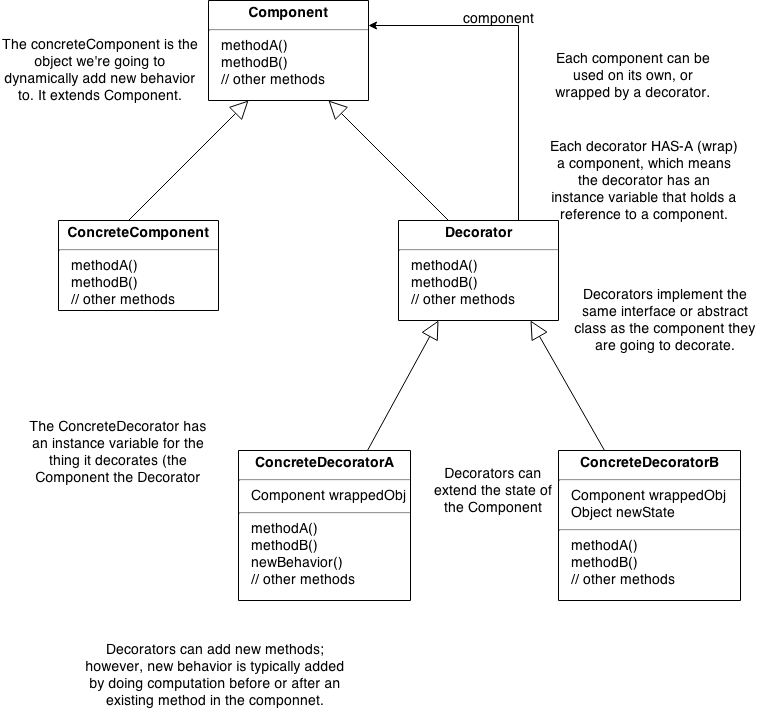
Example: The Beverage code
 1 public abstract class Beverage {
 2     String description = "Unknown Beverage";
 3     public String getDescription() {
 4         return description;
 5     }
 6     public abstract double cost();
 7 }
 8
 9 public abstract class CondimentDecorator extends Beverage {
10     public abstract String getDescription();
11 }
12
13 public class Espresso extends Beverage {
14     public Espresso() {
15         description = "Espresso";
16     }
17     public double cost() {
18         return 1.99;
19     }
20 }
21
22 public class HouseBlend extends Beverage {
23     public HouseBlend() {
24         description = "House Blend Coffee";
25     }
26     public double cost() {
27         return 0.89;
28     }
29 }
30
31 public class Mocha extends CondimentDecorator {
32     Beverage beverage;
33     public Mocha(Beverage beverage) {
34         this.beverage = beverage;
35     }
36     public String getDescription() {
37         return beverage.getDescription() + ", Mocha";
38     }
39     public double cost() {
40         return 0.20 + beverage.cost();
41     }
42 }
43
44 public class OpenCoffee {
45     public static void main(String args[]) {
46         Beverage beverage = new Espresso();
47         System.out.println(beverage.getDescription() + " $" + beverage.cost());
48
49         Beverage beverage2 = new HouseBlend();
50         beverage2 = new Mocha(beverage2);
51         beverage2 = new Mocha(beverage2);
52         beverage2 = new Whip(beverage2);
53         System.out.println(beverage2.getDescription() + " $" + beverage2.cost());
54     }
55 }
Command Pattern
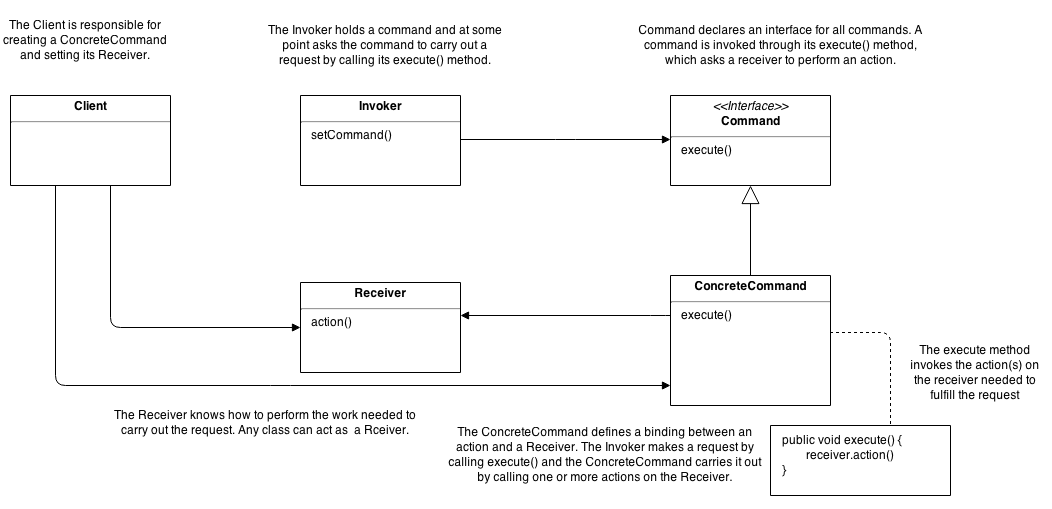
In object-oriented programming, the command pattern is a behavioral design pattern in which an object is used to represent and encapsulate all the information needed to call a method at a later time. This information includes the method name, the object that owns the method and values for the method parameters.
 1 public interface Order {
 2     public abstract void execute();
 3 }
 4
 5 // Receiver
 6 class StockTrade {
 7     public void buy() {
 8         System.out.println("You want to buy stocks");
 9     }
10     public void sell() {
11         System.out.println("You want to sell stocks ");
12     }
13 }
14
15 // Invoker
16 class Agent {
17     private m_ordersQueue = new ArrayList();
18
19     public Agent() {
20     }
21
22     void placeOrder(Order order) {
23         ordersQueue.addLast(order);
24         order.execute(ordersQueue.getFirstAndRemove());
25     }
26 }
27
28 //ConcreteCommand
29 class BuyStockOrder implements Order {
30     private StockTrade stock;
31     public BuyStockOrder (StockTrade st) {
32         stock = st;
33     }
34     public void execute() {
35         stock.buy();
36     }
37 }
38
39 //ConcreteCommand
40 class SellStockOrder implements Order {
41     private StockTrade stock;
42     public SellStockOrder (StockTrade st) {
43         stock = st;
44     }
45     public void execute() {
46         stock.sell();
47     }
48 }
49
50 // Client
51 public class Client {
52     public static void main(String[] args) {
53         StockTrade stock = new StockTrade();
54         BuyStockOrder bsc = new BuyStockOrder (stock);
55         SellStockOrder ssc = new SellStockOrder (stock);
56         Agent agent = new Agent();
57
58         agent.placeOrder(bsc); // Buy Shares
59         agent.placeOrder(ssc); // Sell Shares
60     }
61 }
Singleton Pattern
There are many objects we only need one of: thread pools, caches, dialog, boxes, object that handle preferences and registry settings, objects used for logging, and objects that act as device drivers to devices like printers and graphics cards. In fact, for many of these types of objects, if we were to instantiate more than one we’d run into all sort of problems like incorrect program behavior, overuse of resources, or inconsistent results.
how
 1 public class Singleton {
 2     private static Singleton uniqueInstance;
 3     // other useful instance varuables here
 4
 5     private Singleton() {}
 6
 7     public static synchronized Singleton getInstance() {
 8         if (uniqueInstance == null) {
 9             uniqueInstance = new Singleton();
10         }
11         return uniqueInstance;
12     }
13
14     // other useful methods here
15 }
Or move to an eagerly created instance rather than a lazily create one.
1 public class Singleton {
2     private static Singleton uniqueInstance = new getInstance();
3
4     private Singleton() {}
5
6     public static Singleton getInstance() {
7         return uniqueInstance;
8     }
9 }
Use “double-checked locking” to reduce the use of synchronization in getInstance().
 1 public class Singleton {
 2     private volatile static Singleton uniqueInstance;
 3
 4     private Singleton() {}
 5
 6     public static Singleton getInstance() {
 7         if (uniqueInstance == null) {
 8             synchronized (Singleton.class) {
 9                 if (uniqueInstance == null) {
10                     uniqueInstance = new getInstance();
11                 }
12             }
13         }
14         return uniqueInstance;
15     }
16 }
Adapter Pattern
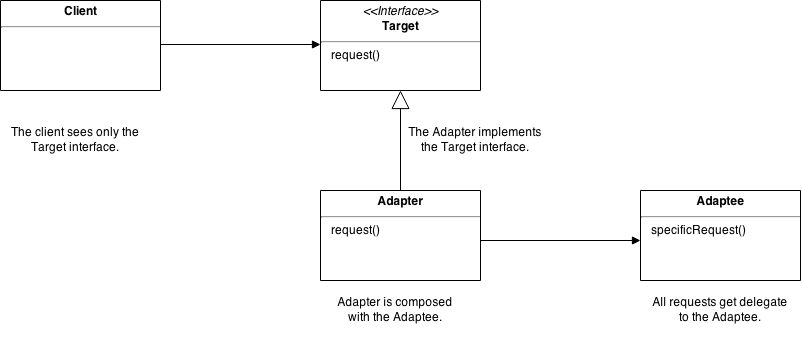
The Adapter Pattern converts the interface of a class into another interface the clients expect. Adapter lets classes work together that couldn’t otherwise because of incompatible interfaces.
Object Adapter
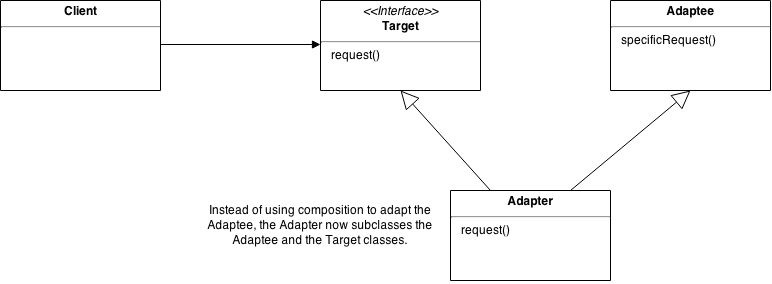
Class Adapter